Beginning
距離我從 Windows 切換到 MacOS 作為我的工作環境已經一個多月了。
我在 Windows 上使用的是 Weasel 輸入法,比起原生的順手太多,而且可自訂性也很強。
MacOS 的原生輸入法也會卡頓和不跟手,我花了一會時間配置好了 Squirrel 作為主力輸入法,效果不言自明。
Installation
先透過 Homebrew 安裝 Squirrel,然後 logout。
brew install --cask squirrel-app我選擇了 Rime-ice 這個詞庫。
先安裝下東風破,我順便把他的別名加到了 .zshrc。
cd ~
git clone https://github.com/rime/plum.git plum

echo 'alias "rime-install"="~/plum/rime-install"' >> ~/.zshrc
然後就能透過東風破安裝 Rime-ice 詞庫了。
bash rime-install iDvel/rime-ice:others/recipes/fullConfiguration
開啟 Settings,新增 Squirrel 輸入方式。
然後在軟體目錄下新增幾個用來客製化的檔案 default.custom.yaml,squirrel.custom.yaml rime_ice.custom.yaml,最後這一個取決於你用什麼輸入方式,這裡我使用的是預設的雾凇拼音。
順便提一嘴 patch 的格式可以在官方 Wiki 和 alswl/Rime 找到格式。
先從rime_ice.custom.yaml 開始,因為 Rime 預設繁體變體是 HK,我更習慣 TW,所以要修改一下。
patch:
  traditionalize/opencc_config: s2tw.json
而 squirrel.custom.yaml 主要是編輯樣式,所以放在最後。接下來編輯 default.custom.yaml。
patch:
  schema_list:
    - schema: rime_ice # 雾凇拼音(全拼)
    #- schema: t9                     # 九宫格(仓输入法)
    #- schema: double_pinyin          # 自然码双拼
    #- schema: double_pinyin_abc      # 智能 ABC 双拼
    #- schema: double_pinyin_mspy     # 微软双拼
    #- schema: double_pinyin_sogou    # 搜狗双拼
    #- schema: double_pinyin_flypy    # 小鹤双拼
    #- schema: double_pinyin_ziguang  # 紫光双拼
    #- schema: double_pinyin_jiajia   # 拼音加加双拼

  menu/page_size: 7
  ascii_composer:
    good_old_caps_lock: true # true | false
    switch_key:
      Caps_Lock: clear # commit_code | commit_text | clear
      Shift_L: noop # commit_code | commit_text | inline_ascii | clear | noop
      Shift_R: noop # commit_code | commit_text | inline_ascii | clear | noop
      Control_L: noop # commit_code | commit_text | inline_ascii | clear | noop
      Control_R: noop # commit_code | commit_text | inline_ascii | clear | noop
  switcher/caption: 「快切选单」
  switcher/fold_options: false
schema_list 是快切選單內的拼寫方式切換,我只用 rime_ice 所以就把其他的註釋掉了。
page_size 顧名思義候選單的個數。
ascii_composer 是英文格式的輸入切換鍵,這裡我把預設的 Shift_L 改為了 noop。另外把選單的名字改成了更順耳的「快切選單」。
fold_options 是是否自動摺疊選項,由於我只用一種拼寫方式,就關掉了自動摺疊。
最後是 squirrel.custom.yaml。
patch:
  style/color_scheme: purity_of_form_custom
  style/color_scheme_dark: purity_of_form_custom_dark
  preset_color_schemes:
    purity_of_form_custom:
      candidate_list_layout: linear
      translucency: true
      border_height: 1
      border_width: 1
      corner_radius: 10
      text_color: 0x525252
      border_color: 0x7a7a7a
    purity_of_form_custom_dark:
      candidate_list_layout: linear
      translucency: true
      border_height: 1
      border_width: 1
      corner_radius: 10
      back_color: 0x292929
      text_color: 0xb5b5b5
      border_color: 0x525252
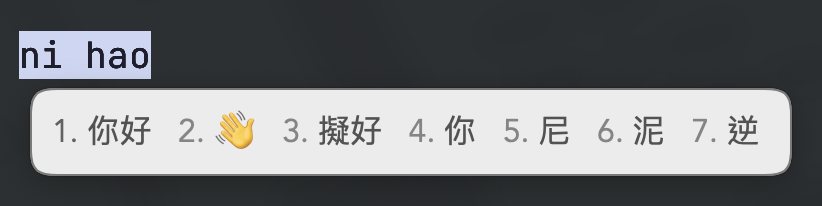
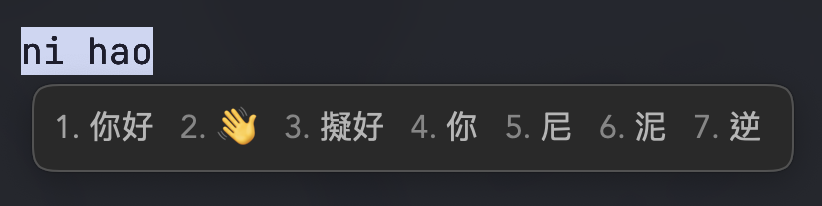
上面是我的主題,我認為不需要配置過多也很美觀。
預覽效果。